1. Overview
1.1 Introduction
Welcome to the Grasshopper Bank Public API Beta Program. This guide provides instructions for tech-forward business banking clients to generate self-serve, read-only API tokens.
The API provides a stable, “integrate once” path to pull your banking data programmatically into ERPs, accounting systems, internal dashboards, and proprietary tools.
1.2 Security & Scope
To ensure the highest level of security and eliminate money-movement risks, this API is strictly read-only.
Supported:
- Pulling transactional data and checking real-time balances.
- Viewing routing information and account metadata.
- Downloading official statements and tax documents.
Not Supported:
- Initiating transfers, payments, or wire transactions.
- Creating payees or modifying account access controls.
- Accessing sensitive personally identifiable information (PII) such as DOB or SSN.
2. Generating Your API Token
Grasshopper provides self-serve token generation directly within your online banking account. Tokens are issued for authorized Admin users only.
2.1 How to Generate A Token
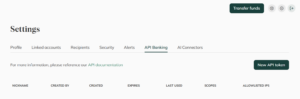
- Log in to the Grasshopper digital banking platform.
- Navigate to Settings → API Banking.
- Click the New API token button.
- Read and review the Programmatic Data Acess Beta Agreement.
- Check the box “I accept the Terms of Use”
- Click Confirm.
- In the creation modal, provide the following configuration details:
- Nickname: A descriptive name for the integration (e.g., “NetSuite ERP Sync”).
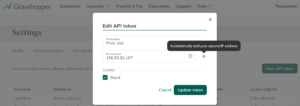
- IP address: Enter one or more IP addresses (comma-separated IPv4 or IPv6) authorized to make API requests.
- Note: IP whitelisting is strictly required for all active tokens. Make sure to hit enter to save the IP address
- Scope: Check the box for Read
- Click Create Token.
2.2 Securing Your Credentials
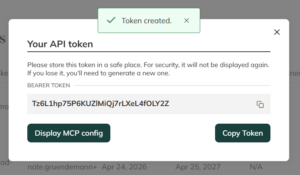
Upon creation, the system will display your Bearer Token and Header Secret on the screen. Copy and store these credentials in a safe place (such as a secure password vault) immediately. For security reasons, they will not be displayed again. If you lose them, you must revoke the token and generate a new one.
Always revoke tokens immediately upon employee turnover to prevent continued unauthorized access.
3. Authentication & Making Requests
3.1 Auth Header Structure
All requests to the API must be authenticated using the credentials generated in the previous step. Please ensure the following HTTP headers are included in every request payload:
GET /v1/accounts HTTP/1.1
Host: api.grasshopper.com
Authorization: Bearer <Your_Bearer_Token>
x-api-secret: <Your_Header_Secret>
Accept: application/json
NOTE: You must send the token inside the standard HTTP Bearer Authorization. Ensure the “Bearer” term is included in the authorization header. Syntax: “Bearer <token>”
3.2 Environments
# Production Base URL
https://online.grasshopper.bank/v1/banking/docs/
4. Available Data & Capabilities
Your read-scoped token grants GET access to the following resource areas:
| Resource Area | Endpoint Path | Capabilities & Data Provided |
|---|---|---|
| Accounts | GET /v1/accounts | Account metadata, statuses, nicknames, available/current/ledger balances, and hold information across all deposit accounts. |
| Transactions | GET /v1/transactions | Posted and pending transactions with counterparty details, amounts, dates, and categorization. Transaction images (check deposits, RDC captures) are also available. |
| Transfers | GET /v1/transfers | Internal and external transfer history; scheduled and recurring transfer read access. |
| Payment Networks | GET /v1/routing | ACH and wire routing information per account (useful for verifying inbound-payment setup). |
| External Accounts | GET /v1/external | Linked external accounts the user has verified. |
| Documents | GET /v1/documents | PDF statements, 1099s, and other official account documents. |
| Payees | GET /v1/payees | Read-only view of saved ACH payees and wire recipients. |
NOTE: Although PUT, POST and DELETE endpoints are recorded in the documentation, they are currently unavailable. As we work towards enabling access to more endpoints, we invite your feedback on any of the endpoints and how it can be improved or introduced.
5. Managing Your Tokens & Limits
5.1 Token Management
Admin users can manage existing tokens by navigating to Settings → API Banking. From this dashboard, you can perform the following administrative actions:
- View: See token Nickname, Creator, Creation Date, Expiration Date, Last Used Date, Scopes, and Allowlisted IPs.
- Edit: Rename the token or add/edit/remove allowed IP addresses dynamically.
- Delete/Revoke: Immediately revoke a token. Best Practice: Revoke tokens immediately upon suspected compromise or employee turnover.
5.2 Rate Limiting
To prevent platform degradation and ensure high availability, we enforce rate limits on all Public API calls.
Global Limit on Read-Only
- 1000 / day
- 200 / 5min
- 60 / min
6. Support & Full API Reference
6.1 Documentation
This guide covers getting started and token management. For the full, endpoint-level API documentation, please refer to the Grasshopper Banking API in online banking.
NOTE: Requires an authenticated, logged-in Grasshopper Bank account to access.
6.2 Support Escalation
If you encounter issues during your integration process, please route your inquiries based on the categories below:
- Token Generation & General Navigation: If you need help finding the API settings, rotating a token, or updating IP whitelists, please contact Client Services.
- Integration Debugging: Integration code, custom scripts, and middleware logic are the sole responsibility of the client.
- Technical API Support: For technical anomalies with the endpoints themselves, reach out to Client Services.
- Feedback: To provide feedback on the API endpoints, issues, additions, change in structure, etc. please reach out to Thanu Ramachandraiah.
NOTE: If you are interested in an AI-powered alternative for data analysis, explore our AI Connector.
7. Troubleshooting & FAQs
7.1 Authentication Errors (401 Unauthorized)
If you receive a 401 Unauthorized error, verify the following:
- Header Format: Ensure you are using the standard HTTP Authorization header with the Bearer prefix.
- Correct Header:
Authorization: Bearer <your_token>
- Correct Header:
- IP Whitelisting: API requests must originate from an IP address included in your token’s allowlist.
- Best Practice: If your network environment uses dynamic IPs (e.g., standard VPNs), consider assigning a static egress IP. If you are testing locally, use the “Automatically add your current IP address” option in the Grasshopper API dashboard to quickly update your allowlist.
- Credential Freshness: Ensure you are using the correct Bearer Token and Header Secret. If these credentials were lost, they cannot be recovered; you must revoke the existing token and generate a new one.
7.2 Common Developer Considerations
- Rate Limiting (HTTP 429): We enforce a limit of 5,000 requests per hour per IP.
- Implementation Tip: Always implement exponential back-off and retry logic in your API client to handle rate-limit spikes gracefully.
- Token Security: Credentials are displayed only once upon creation. Store them in a secure secret manager (e.g., AWS Secrets Manager, HashiCorp Vault) immediately.
- Lifecycle Management: Regularly audit your active tokens. Revoke tokens immediately upon employee turnover or suspected credential exposure.
- Environment Parity: Ensure your code base clearly separates Production base URLs from any local testing configurations to prevent accidental cross-environment API calls.